Using AI Tools in Teaching Special Education
Let’s be honest. When you first hear “AI,” it may sound complicated, confusing, or like just one more thing to learn on top of your already packed day. Maybe you’ve heard other teachers talk about it, but you’re not sure where to start, or you’re worried it’s not made with special education in mind.
Don’t worry! AI is really just a helpful tool you can use to make teaching easier. And in a special education classroom, that extra help can go a long way.
Whether you need help making your lessons simpler, creating questions for a reading, or making visuals your students can actually connect with—AI can do all of that (and more).
The best part? Many tools are free or offer free versions!
In this post, I’ll share how using AI can make teaching in a special education classroom easier, and then give you a list of AI tools and websites you can start using right away.
How AI Can Help in SPED Classrooms

AI can help in many ways in special education. It can make lessons more personal, help students feel more included, and give teachers back some of their time by handling the little things behind the scenes. It’s not about replacing teachers, it’s about giving us tools to work smarter, not harder.
Here are simple ways teachers are using AI to support SPED learning:
1. Personalized Support for Every Student
Every student learns differently, especially in special education. Some move quickly, others need more time—and that’s okay! AI-powered learning tools can adjust lessons to match how fast a student is learning and what style works best for them.
Got students working at different levels? You can paste a reading passage into an AI tool and ask for both an easier version and a more advanced one.
2. Making Learning More Accessible
Students with learning disabilities like ADHD or dyslexia often have difficulty with traditional educational methods. AI is great for helping them access and understand learning materials in ways that work for them.
Some AI tools can read text aloud or turn speech into text, while others offer real-time captions for videos. These are super helpful for students who struggle with reading, writing, or listening.
Additionally, there are AI image tools that can quickly help you make visual schedules, classroom labels, or picture-based instructions without starting from scratch.
3. Assisting with Lessons
With just a few clicks, AI can turn a story or article into multiple-choice questions, true or false, fill-in-the-blanks, or writing prompts—saving you so much prep time.
It can also turn lessons into games or animated videos, making learning more fun and less intimidating for special education students.
4. Empowering Teachers
AI is not here to take your job—it’s here to make your job easier.
It can help you with planning and daily teacher tasks, like suggesting lesson activities, creating quizzes, or providing visuals for your topic. Some tools even offer sample IEP goals, accommodation ideas, and behavior strategies based on student needs (though, of course, you’ll still customize everything to fit your students best).
If you need to quickly learn more about a specific disability or find strategies that work, AI can save you time by giving clear and helpful overviews.
Best of all, by handling repetitive tasks like grading or adjusting reading levels, AI gives you more time and energy to do what matters most—connect with your students and support their progress.
Recommended AI Tools for SPED Teachers
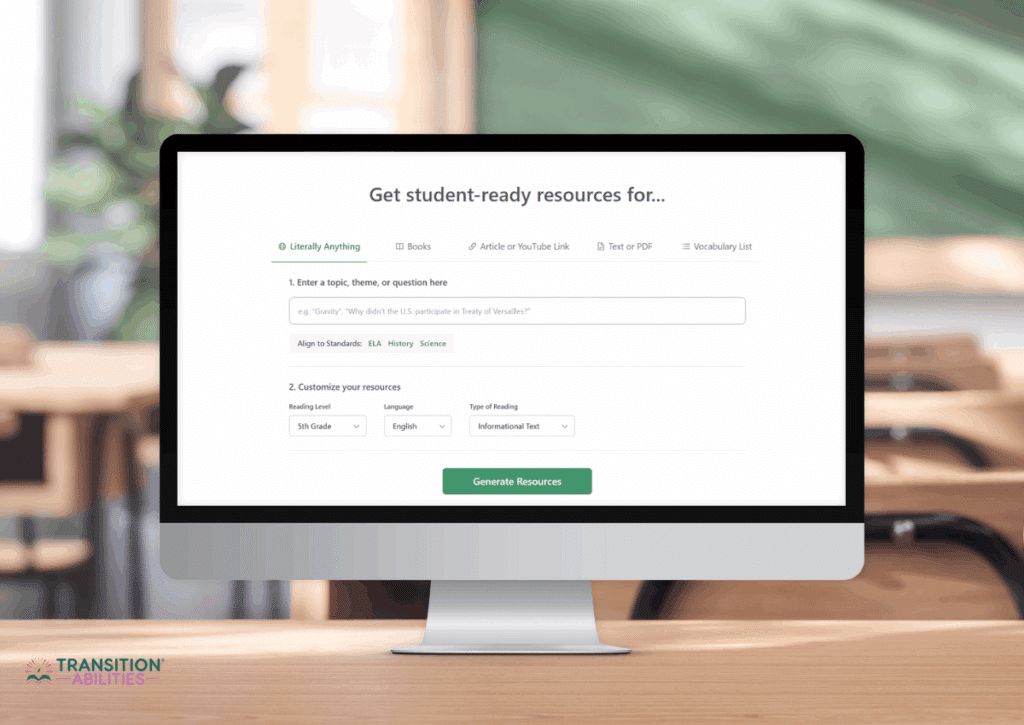
Now that you’re more aware of the things AI-powered tools can help us with, I’ve listed some recommended AI tools you can use. They’re especially helpful in special education, and some are even free to use!
Magic School AI offers tons of time-saving tools like:
- Generating IEP goal suggestions
- Behavior strategies
- Comprehension questions
- Simplified lesson plans
It’s super easy to use. Just pick the tool you need, type in your topic or student goal, and it creates something for you in seconds.
Magic School was designed with teachers in mind, so the tone and content are classroom-ready. This is especially helpful for special education teachers who need to individualize instruction or write plans for multiple students.
Plus, it’s free for teachers, with a paid version available if you want to access premium features.
Education Copilot takes a different angle. Instead of a lot of small generators, it drafts the bigger pieces of planning for you:
- Lesson plans built around a standard
- Worksheets and quizzes
- Slide decks for your lesson
- Rubrics and full unit plans
You type in your topic and grade level, and it writes the first draft. You’ll still want to simplify the reading level and add visuals for your students, but it gets you past the blank page.
It helps most when you’re planning a new unit from scratch, and less with day-to-day accommodations. You can try it for free, and the paid plan is around $9 a month if you end up using it often.
An amazing tool for reading and comprehension, Diffit will create easier or more complex versions of lesson material at different reading levels. Just paste a link, article, or text! It also gives you comprehension questions, vocabulary, and printable worksheets.
For special education teachers, this makes differentiation super quick and doable, especially when you need several levels of the same content for your class.
Diffit offers a free plan with limited monthly use, and a premium version if you need more.
Brisk is a free Chrome extension that works on top of what you’re already using. Open an article, a Google Doc, or a web page, and Brisk can rewrite it at a different reading level, build comprehension questions from it, or turn it into a quiz.
For special education, the reading level tool is the one you’ll probably use most. You can take a grade-level article, bring it down to a level your student can actually read, and still have the whole class working from the same content.
The main teacher tools are free, with paid plans for extra features and for schools.
Need interactive slides? Check out Curipod! It’s a free tool for teachers that can generate social-emotional learning prompts, polls, warm-ups, and even full lessons based on your topic. You choose a format or template, type in your subject, and Curipod builds the lesson for you.
It’s great for visual learners and students who benefit from engaging, interactive content!
Canva is becoming one of the most popular tools for more than just graphic design. It now includes AI writing help called Magic Write and an AI image and art generator. You can use it to create social stories, behavior visuals, classroom posters, slides, and schedules—basically anything you want to make more student-friendly and personalized.
It’s perfect for special education because you can easily include visuals and adjust your designs based on your students’ interests and needs.
And the best part? Canva for Education is completely free for teachers and students! You just need to have a school email address and get it verified.
Everway was formerly known as Texthelp, and it offers a literacy support tool called Read&Write. It’s a Chrome extension or desktop tool that reads text aloud, helps with vocabulary, offers a picture dictionary, and allows for voice typing.
This is a great support for students with dyslexia, ADHD, or visual impairments. It’s built for students and very easy to use, so they can use it without needing adult support.
Read&Write is free for K-12 teachers. Everway gives teachers free premium access, and student and school seats are paid.
For students who struggle with writing or typing, AudioPen is a helpful AI website. It lets you record your voice and turns what you say into clear, organized text. It’s super simple—just press record, talk, and it writes for you.
This tool is also great for teachers who want to quickly take notes during IEP meetings, observations, or behavior tracking.
AudioPen has a free version, with a paid upgrade for more storage and editing features.
Tips for Getting Started

Trying out AI for the first time can feel a little overwhelming, but it doesn’t have to be! Here are some helpful tips to make your experience smooth, successful, and time-saving (instead of time-consuming).
- Start small. Don’t feel like you have to learn five new tools all at once. Choose one AI tool that seems the most useful to you—maybe something to simplify reading, create lesson materials, or help with planning. Use it for one task a week until you feel more confident.
- Use your professional judgment. Even though AI gives fast results, it doesn’t always get things perfect. Review everything it creates, and adjust the language, visuals, or tone to match your students’ needs. Think of it as a helpful draft, not the final product.
- Be mindful of student privacy. Avoid putting personal student information like full names, disabilities, or behavior records into AI tools, especially if the tool stores or learns from your input. Stick to general topics or use placeholder names when possible.
Smart Teaching, Less Stress
AI isn’t a replacement for the heart, skill, and creativity of special education teachers, but it can be an incredible support. With the right tools, you can save time, meet student needs more efficiently, and create a more inclusive classroom.
Try one or two tools from the list above and see how they fit into your workflow. You might be surprised at how helpful they become, both for you and your students!